


A Beginner’s Guide to Choosing a Physiotherapy Website Template for Your Clinic
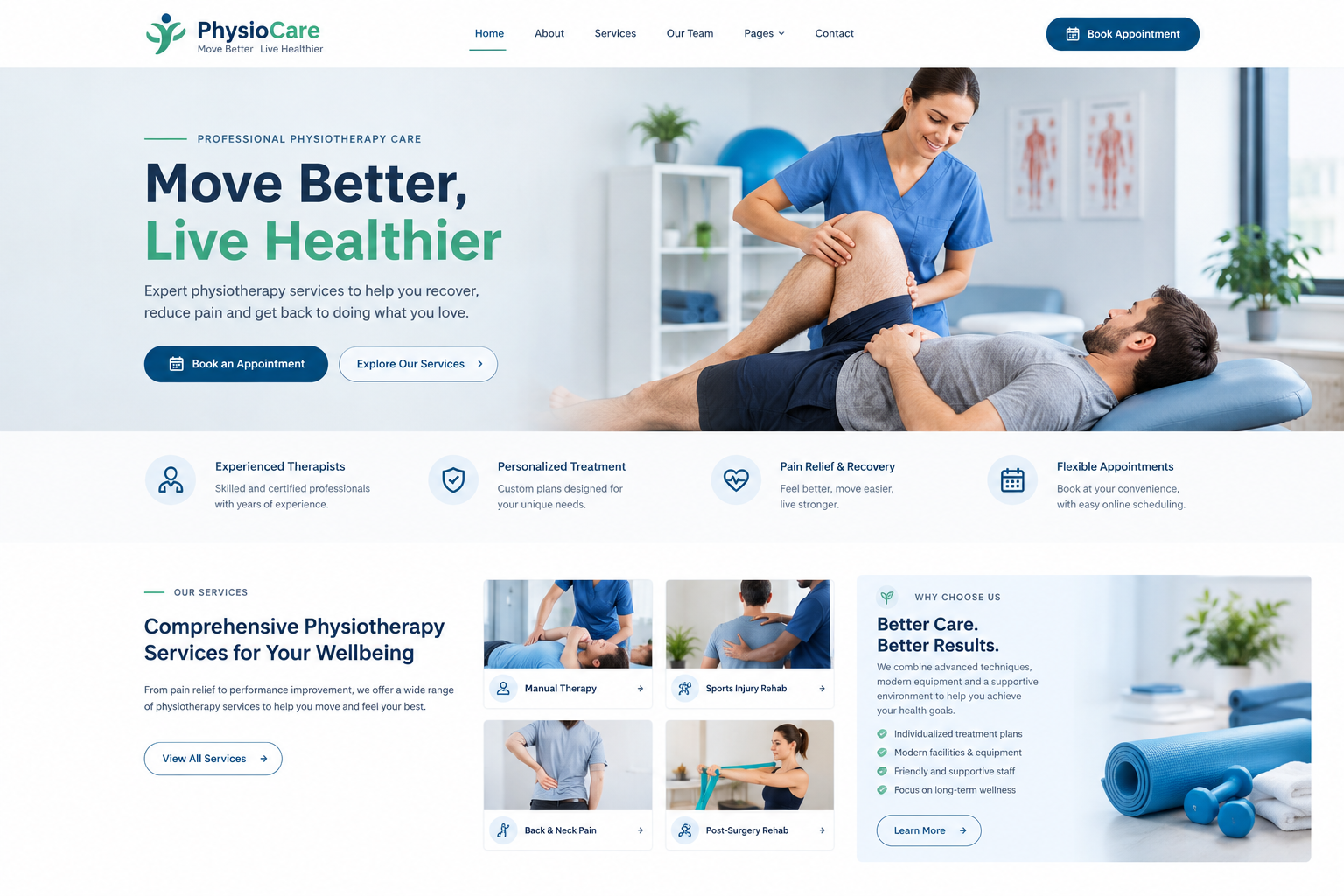
When someone has back pain, a sore knee, or a sports injury, one of the first things they do is search online. They look for a clinic nearby, check a few websites, and decide who to call. A well-designed physiotherapy website template can help your clinic present its services clearly and create a professional first impression. When your website is easy to understand, patients can find the information they need and feel more confident about contacting your clinic.
But building a website from scratch can feel like a lot, especially if you are busy treating patients. That is where a website template comes in. A template gives you a ready-made design, so you only need to add your own details. This guide will help you choose the right one, even if you have never done it before.
Why a Template Is a Good Choice for a Clinic
It Saves Time
Running a clinic leaves little free time. A template gets your site up in days instead of months. You can add your services, photos, and contact details, and go live quickly.
It Saves Money
A custom website can cost a lot. A template is usually much cheaper, and it can still look polished and professional. This is helpful for new clinics and small practices.
It Is Easy to Manage
Most templates use simple editing tools. You can change text, swap photos, and update opening hours without writing any code. If you can use a basic word processor, you can manage one.
What a Physiotherapy Template Should Include
A Calm and Clean Design
People visiting a physiotherapy site may be in pain or worried. A clean layout with soft colors, plenty of white space, and easy to read text helps them feel at ease. Avoid designs that feel busy or loud.
A Clear Services Section
Patients want to know what you treat. Look for a template with space to show services like back pain care, sports injuries, post surgery rehab, and neck and shoulder problems. Each service can have a short title, an icon, and a few lines.
Easy Appointment Booking
This is one of the most important features. A booking button or form should be easy to find on every page. Some templates work with booking plugins, so patients can pick a time without calling.
Practitioner Profiles
Patients like to know who will treat them. A neat section with photos, names, and short bios helps. Only share qualifications that are real and current.
Patient Reviews
Look for a template that has a nice spot for reviews. Short comments from happy patients can build trust. Only use real reviews, and ask for permission.
Clinic Information
Your address, phone number, opening hours, and a map should be easy to find. A click to call button on mobile helps people reach you quickly.
Before You Visit Section
A short page that explains what to expect at a first visit helps new patients feel less nervous. Look for a template with simple page layouts for this kind of information.
Read More: 37 Best Healthcare Website Templates for WordPress (Free & Paid)
Technical Things to Check
Mobile Friendly Design
Many people will open your site on their phones. Make sure the template looks good on small screens, with big text and easy to tap buttons. Always test the demo on your own phone.
Fast Loading Speed
A slow website frustrates visitors. Choose a template built for speed, and keep your photos light. Compress images before you upload them.
Search Friendly Structure
A good template has clean code and clear headings, which helps search engines understand your pages. It will not do all the work for you, but it gives you a good start for being found locally.
Updates and Support
Pick a template that gets regular updates and has a support team. Old templates can cause errors or security problems. Check the last update date before you buy.
Privacy and Safety
If your site has contact or booking forms, make sure they are set up safely. Avoid asking patients to share detailed health information on a public form. Keep it to basic details, and discuss the rest during the visit. Follow the privacy rules that apply in your area.
Things Beginners Often Forget
Do Not Choose by Looks Alone
A demo can look amazing because of its photos. Imagine your own photos and text in the template before you decide.
Check How Much You Can Change
You should be able to adjust colors, fonts, and layouts to match your clinic. Your site should feel like your clinic, not a copy of the demo.
Think About Growth
You may add new services, new staff, or a blog later. Choose a template that is flexible enough to grow with you.
Read What Other Buyers Say
Reviews from other buyers can reveal problems that a demo will never show. Look for comments about support, speed, and ease of use.
Test the Booking Feature
If booking is a big part of your site, check how it works with the template. Make sure it is simple for patients to use.
Content That Makes Your Template Work Better
Write in Plain Words
Instead of “musculoskeletal rehabilitation,” say “helping you recover from muscle and joint problems.” Plain words make patients feel welcome and understood.
Use Real Photos
Photos of your clinic, your team, and your treatment room feel more real than stock pictures. Always get permission before showing any patient.
Explain Your Approach
A short section about how you work, such as listening to the patient, building a plan, and guiding exercises, helps people understand what to expect.
Be Honest
Avoid big promises about results. Every person recovers differently. Honest wording builds more trust than bold claims.
Add Helpful Tips
A short page with simple posture tips or easy stretches can show that you care. Make sure the advice is general and safe, and remind readers to seek proper care for their own situation.
Features That Help Turn Visitors Into Patients
Clear Call to Action Buttons
Place buttons like “Book an Appointment” and “Call the Clinic” in easy-to-see spots. Keep the wording friendly.
Short Contact Form
Ask for name, phone number, and a short message. A shorter form is more likely to be filled in.
Location and Directions
A map and simple directions help new patients find you. Mention parking or public transport if it helps.
Conclusion
Choosing a physiotherapy website template does not have to be hard. Look for a calm design, a clear services section, easy booking, practitioner profiles, and a layout that works well on phones. Check speed, updates, and support, and make sure you can add your own photos and words. A good template saves time and money, and it helps patients trust your clinic from the first click. If you are ready to build or refresh your site, take a look at premium WordPress Templates made for physiotherapy clinics. They often come with ready-made service pages, booking sections, and contact forms, so you can focus on your patients while your website does its job.
Frequently Asked Questions
1. Why should a physiotherapy clinic use a website template?
A template saves time and money, and it gives you a professional look without needing a designer. It is a practical choice for most small clinics.
2. What is the most important feature in a physiotherapy template?
Easy appointment booking is one of the most important features. Patients should be able to find the booking button quickly on any page.
3. Do I need coding skills to use a template?
No. Most WordPress templates use drag-and-drop tools, so you can change text, photos, and colors without writing code.
4. Should I share health details through my website forms?
It is best not to ask for detailed health information on a public form. Keep forms simple, and follow the privacy rules in your area.
5. How can I make my clinic site stand out?
Use real photos, plain language, honest wording, and clear information about your services and team. These small things help patients feel comfortable and ready to book.

 English
 Arabic
 French
 Spanish
 Portuguese
 Deutsch
 Turkish
 Dutch
Dutch
 Italiano
 Russian
 Romaian
 Greek
Greek