


Creality Print Settings Optimization for Stronger 3D Prints
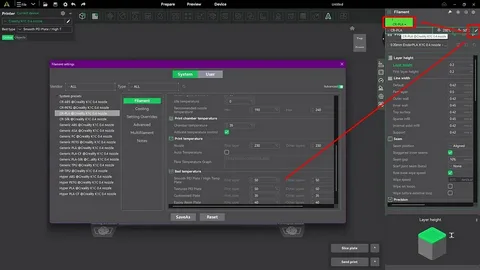
Optimizing creality print settings is one of the most important steps in achieving durable, high-quality 3D prints. Whether you are a beginner or an experienced maker, the way you configure your slicer settings directly affects print strength, surface quality, and overall reliability. Small adjustments in temperature, layer height, speed, and infill can transform weak, brittle models into strong and functional parts.
This guide explains how to fine-tune your Creality slicer configuration to improve print strength while maintaining efficiency and detail.
Understanding Creality Print Settings Basics
Before diving into advanced adjustments, it’s essential to understand the foundation of creality print settings. These settings control how your 3D printer interprets a digital model and turns it into a physical object. The slicer breaks your model into layers, sets temperatures, determines extrusion rates, and defines movement paths.
A solid understanding of these basics helps you avoid common printing issues like under-extrusion, weak layer adhesion, and warping. Once you grasp how each setting interacts, you can make informed changes instead of random adjustments.
Key beginner-friendly optimizations include balancing quality and strength, ensuring proper bed adhesion, and using stable default profiles as a starting point.
Key points to consider:
- Start with Creality’s default material profiles
- Understand filament behavior (PLA, PETG, ABS)
- Always calibrate your bed leveling first
- Monitor extrusion consistency
- Avoid changing multiple settings at once
- Test with small calibration prints first
Layer Height and Print Resolution Optimization
Layer height plays a major role in both strength and visual quality when adjusting creality print settings. Smaller layer heights produce smoother surfaces but take longer to print, while larger layer heights improve speed but may reduce fine detail. However, strength is often improved with balanced mid-range layer heights due to better layer bonding.
Choosing the right layer height also depends on nozzle size. For a standard 0.4mm nozzle, a layer height between 0.16mm and 0.24mm is often ideal for strong prints with good detail retention.
Adjusting resolution too aggressively can lead to weak adhesion between layers, so finding the right balance is key for structural integrity.
Key points to consider:
- Use 25%–75% of nozzle diameter for layer height
- Lower layer height improves detail but increases time
- Higher layer height can improve inter-layer bonding in some cases
- Avoid extreme values that reduce structural strength
- Use adaptive layer height for complex models
- Match layer height with print purpose (cosmetic vs functional)
Temperature Settings for Stronger Prints
Temperature is one of the most critical factors in creality print settings because it directly affects how well layers fuse together. If the nozzle temperature is too low, filament may not bond properly, resulting in weak and brittle prints. If it is too high, you may experience stringing, blobs, or overheating issues.
Each filament type requires a different temperature range. PLA typically prints between 190°C–210°C, while PETG and ABS require higher temperatures for better layer adhesion and durability.
Bed temperature also plays a crucial role in preventing warping and improving first-layer adhesion, which is essential for strong prints.
Key points to consider:
- PLA: 190°C–210°C for balanced strength and detail
- PETG: 220°C–250°C for durability and flexibility
- ABS: 230°C–260°C with heated bed support
- Increase temperature slightly for stronger layer bonding
- Avoid overheating to prevent stringing and deformation
- Always calibrate temperature using a test tower
Speed and Retraction Settings
Print speed significantly impacts how well layers bond together in creality print settings. Faster speeds reduce print time but can weaken adhesion because the filament does not have enough time to properly fuse. Slower speeds generally improve strength and detail but increase overall print duration.
Retraction settings are equally important in preventing stringing and maintaining clean extrusion paths. Incorrect retraction can lead to weak points or gaps in the print structure, especially in complex models with many travel moves.
Balancing speed and retraction ensures smoother extrusion, stronger bonding, and fewer print defects.
Key points to consider:
- Use 40–60 mm/s for balanced print strength
- Slow down outer walls for better surface quality
- Adjust travel speed to reduce stringing
- Enable proper retraction distance (4–6 mm for Bowden systems)
- Fine-tune retraction speed to prevent clogging
- Avoid excessive speed in structural parts
Infill and Wall Strength Optimization
Infill and wall settings are the backbone of strong prints in creality print settings. Infill determines the internal structure of the model, while wall thickness defines outer durability. A well-balanced combination ensures both strength and material efficiency.
Higher infill percentages increase strength but also add weight, cost, and print time. Similarly, thicker walls significantly improve durability, especially for functional parts like tools, brackets, and mechanical components.
For most functional prints, focusing on wall thickness is often more effective than excessively increasing infill.
Key points to consider:
- Use 15%–30% infill for general-purpose prints
- Increase to 50%+ for load-bearing parts
- Gyroid and cubic infill patterns provide strong support
- Use at least 3–4 wall lines for durability
- Increase top/bottom layers for better surface strength
- Prioritize wall thickness over infill for functional parts
Conclusion
Optimizing creality print settings is essential for producing stronger, more reliable 3D prints. By carefully adjusting layer height, temperature, speed, retraction, and infill, you can dramatically improve both the mechanical strength and visual quality of your models. The key is to test changes gradually and understand how each setting affects the final outcome.
With consistent calibration and thoughtful tuning, your Creality printer can deliver professional-grade results suitable for both hobby and functional applications.

 English
 Arabic
 French
 Spanish
 Portuguese
 Deutsch
 Turkish
 Dutch
Dutch
 Russian
 Romaian
 Portuguese (Brazil)
 Greek
Greek