


Google Business Profile Management: How Can You Keep Your Business Information Accurate?
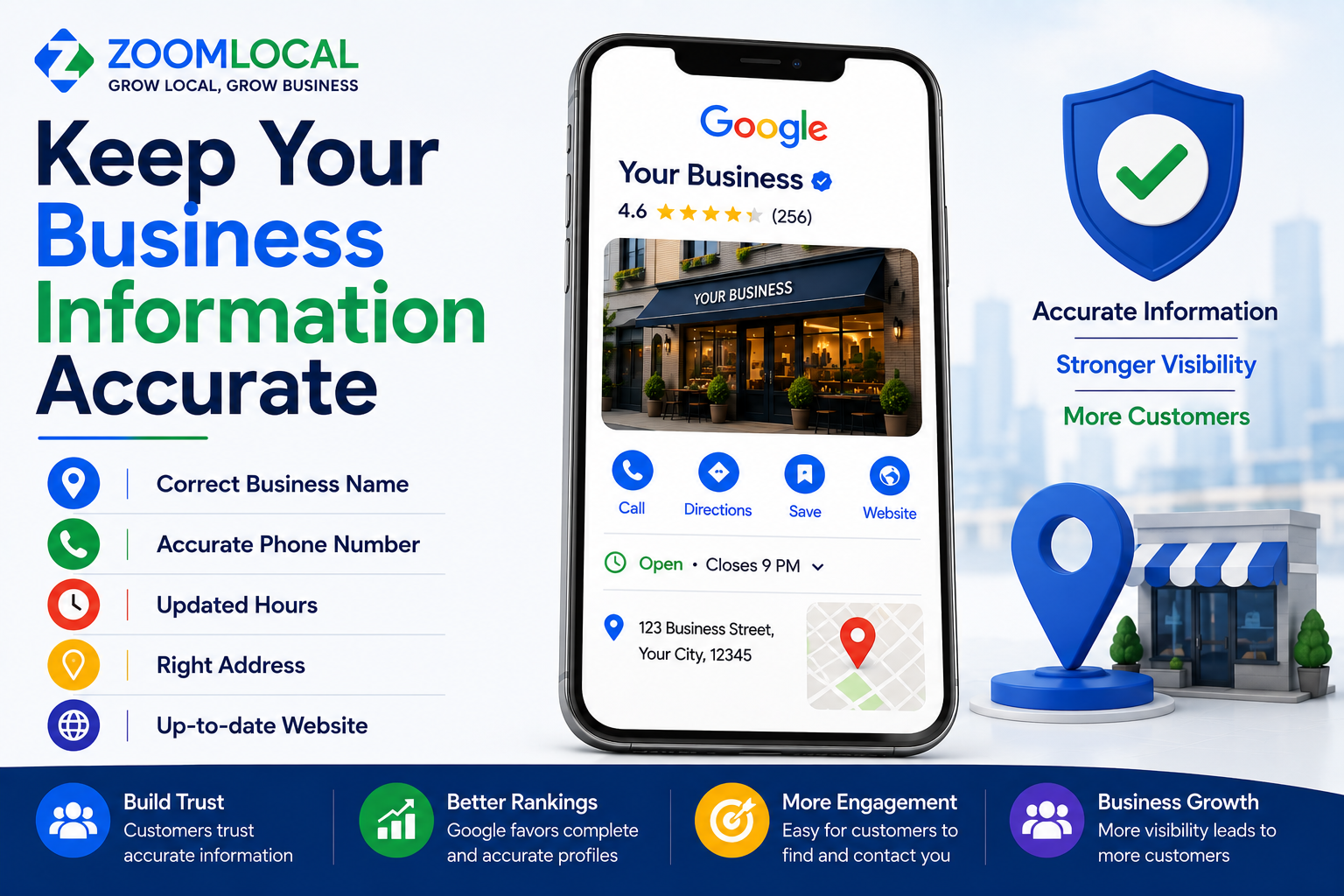
When customers find your business on Google Search or Maps, they often depend on the information shown in your Google Business Profile. Your phone number, address, opening hours, website, services, and other details can influence whether someone calls, visits, requests directions, or explores your website. If any of this information is incorrect, the customer experience can quickly become frustrating.
This is why accurate information should be a major part of Google Business Profile Management. Business details can change over time, and Google may also receive information about your business from different sources. Regularly reviewing your profile helps ensure that potential customers see information that correctly represents your business.
Why Is Accurate Google Business Profile Information Important?
Imagine a customer checking your Google profile before travelling to your location. The profile says you are open until 8 PM, but your business now closes at 7 PM. The customer arrives after closing and finds the doors locked. Even though the mistake may seem small, it creates a poor experience.
The same problem can happen with an outdated phone number, incorrect address, old website link, or service that you no longer provide. Accurate information makes it easier for customers to understand where you are, when you are available, and how they can contact you.
Google also states that businesses with complete and accurate information are more likely to appear in relevant local search results. Keeping your profile current therefore supports both customers and your broader local search presence.
Make Sure Your Business Name Is Correct
Your Google Business Profile name should reflect the name your business actually uses in the real world. It should be consistent with your storefront, signage, website, stationery, and branding.
A common mistake is adding extra keywords, services, locations, phone numbers, or promotional phrases to the business name in an attempt to gain additional search visibility.
For example, if your actual business name is “ABC Dental Clinic,” the profile should not be changed to “ABC Dental Clinic Best Dentist in Pune Dental Implants” simply to include more keywords.
Google's guidelines require businesses to represent themselves accurately. Keep service names, locations, opening hours, and other information in the appropriate profile sections rather than adding them unnecessarily to the business name.
Check Your Address and Map Location
For businesses with a physical location customers can visit, an accurate address is essential.
Review your street address, building details, and map location carefully. A misplaced map pin can cause customers to reach the wrong building or spend additional time searching for your entrance.
If your business moves, update the address rather than leaving customers to discover the change after arriving at the old location.
Service-area businesses should also accurately represent how they operate. If customers are not served at your business address, make sure the profile is configured appropriately rather than displaying an address that could mislead visitors.
The information shown should always match how your business operates in the real world.
Keep Your Phone Number and Website Updated
A customer may find your profile and immediately press the call button. If the displayed phone number is outdated or no longer monitored, you could lose that enquiry.
The same applies to your website.
Check that the website connected to your profile opens correctly and leads customers to the appropriate business website or relevant location page. If your website has recently moved to a new domain or important URLs have changed, review the link on your profile.
For businesses with several branches, make sure customers are directed to information relevant to the correct location whenever appropriate.
These details may seem basic, but they are directly connected to how easily a potential customer can reach your business.
Update Your Opening Hours Whenever They Change
Business hours are among the most important details customers check before visiting.
Your regular hours should accurately show when customers can expect your business to be open. If you operate differently on weekends, make sure those hours are also correct.
Special hours deserve additional attention. Festivals, public holidays, temporary closures, events, maintenance, or seasonal changes may affect your normal schedule.
Do not wait until customers complain that the information is wrong. Whenever your schedule changes, make updating your Google Business Profile part of the same internal process.
Accurate hours reduce confusion and help customers plan their visit with greater confidence.
Keep Your Profile Accurate With Regular Management
Business information can become outdated surprisingly quickly. A changed phone number, new opening schedule, updated service, different website page, or incorrect profile edit can easily go unnoticed when nobody is regularly checking the listing.
Businesses that want ongoing help can explore ZoomLocal's Google Business Profile Management services for support with profile optimization, profile protection, review management, content publishing, local rank tracking, and performance reporting.
Regular management provides an opportunity to catch incorrect or outdated information before it continues appearing to potential customers.
Review Your Primary and Additional Categories
Business categories tell Google and customers what type of business you operate.
Your primary category should represent your main business activity as accurately as possible. Additional categories can be selected when they genuinely describe other important parts of your business.
Avoid adding categories simply because they contain keywords you want to target. Google advises businesses to use categories that accurately describe their core business rather than using categories as keywords.
Your business may also evolve. A category that accurately described your company several years ago might not be the best representation today. Review your categories periodically and update them when your main business activities genuinely change.
Make Sure Your Services Reflect What You Currently Offer
Your services can change as your business develops.
You might introduce a new treatment, remove an old service, expand a product range, or begin offering something that was not available when the profile was originally created.
Review your service information regularly.
Remove services you no longer provide and add important services that customers should know about. Keep descriptions accurate and easy to understand rather than filling them with repeated SEO keywords.
A customer who finds a service on your Google profile should reasonably expect that your business actually provides it.
Keeping this information current helps avoid enquiries for services that are no longer available.
Review Your Business Description
Your business description provides space to explain what your company does and what customers should know about it.
Over time, the description may become outdated. Perhaps you have changed your main services, expanded the business, or repositioned what you offer.
Read the description from a potential customer's perspective.
Does it still accurately describe your business? Is the information useful? Does it contain outdated statements?
The description should focus on relevant information about the business instead of being filled with promotions, excessive keywords, or unnecessary claims.
Periodically reviewing it can help ensure that it continues to represent your company accurately.
Check Relevant Business Attributes
Depending on your business category and location, Google may allow you to display different attributes that provide customers with additional information.
These can relate to facilities, amenities, accessibility, payment options, or other business-specific details.
Only select attributes that accurately apply to your business.
If something changes, update the relevant attribute. For example, if an amenity is no longer available, leaving the old information visible could create an incorrect customer expectation.
Not every business will have access to the same attributes, so review the options available for your specific profile.
Watch for Google Updates to Your Profile
Not every change to your Google Business Profile necessarily comes directly from you.
Google explains that it gathers business information from different sources, including user reports and licensed content. If information from these sources suggests that your profile is incorrect or outdated, Google may update certain details.
This is an important reason to monitor your profile regularly.
Check important information such as your business name, address, hours, website, phone number, and categories. If you notice an unexpected change, review it carefully and make corrections where necessary.
Assuming that your information will remain exactly the same after the initial setup can allow inaccuracies to remain unnoticed.
Keep Your Website and Google Profile Consistent
Your Google Business Profile should not operate separately from the rest of your online presence.
Customers may move from your profile to your website within seconds. Major information should therefore be consistent across both platforms.
Check your business name, address, phone number, opening hours, services, and other important details.
For example, if Google shows that your business closes at 8 PM but your website says 7 PM, customers may not know which information is correct.
Whenever an important business detail changes, update all relevant platforms instead of changing only one.
Create an Internal Process for Business Changes
One of the easiest ways to maintain accurate information is to create a simple update process.
Whenever your company changes its opening hours, phone number, website, address, services, or other important information, Google Business Profile should be included in the list of places that need updating.
This is particularly useful for multi-location businesses.
Each branch may have different hours, phone numbers, services, photos, or temporary closures. Managing these details without a clear process can lead to inconsistencies between locations.
Assigning responsibility for profile updates can also prevent situations where everyone assumes someone else has already made the change.
Review Customer Feedback for Possible Information Problems
Customer reviews can sometimes reveal profile inaccuracies.
A customer may mention that the displayed opening hours were incorrect, that the phone number did not work, or that a particular service was unavailable.
Do not treat these comments only as reputation issues.
Use them as signals to check whether your business information needs to be corrected.
The same applies to direct customer questions. If people repeatedly ask about something that should already be clear from your profile, consider whether that information could be presented more accurately.
Don't Make Changes Just for Rankings
Accurate profile management is different from constantly editing information in an attempt to influence rankings.
Changing categories unnecessarily, adding keywords to the business name, displaying inaccurate service areas, or modifying information that already correctly represents your business can create more problems than benefits.
Google explains that local results are primarily based on relevance, distance, and prominence. There is no legitimate profile edit that guarantees a particular local ranking.
The better approach is to ensure every important detail genuinely represents your business and helps customers understand what you provide.
Make Accuracy an Ongoing Part of Profile Management
Keeping your Google Business Profile accurate is not a task that ends after the profile is created.
Business information changes, customers provide new feedback, Google may receive information from other sources, and individual locations may update their operations.
A regular profile review can help catch these changes early.
For businesses that prefer ongoing assistance, explore ZoomLocal's Local SEO and Google Business Profile Management services to learn how profile optimization, monitoring, reputation management, content, local rank tracking, and reporting can be managed together.
Frequently Asked Questions
Why does Google change my business information?
Google may update Business Profile information based on information it receives from different sources, including user reports and licensed content. Businesses should monitor their profiles and review unexpected updates.
How do I keep my Google Business Profile information accurate?
Regularly check your business name, address or service area, phone number, website, hours, categories, services, description, and relevant attributes. Update information whenever your business changes.
Should my Google Business Profile name include keywords?
Your profile name should reflect your real-world business name. Unnecessary keywords, locations, services, or promotional wording should not be added simply for SEO purposes.
What should I do when my opening hours change?
Update your regular or special hours as soon as the change is confirmed. This is especially important for holidays, festivals, temporary closures, and seasonal schedules.
How often should I check my business information?
There is no single schedule suitable for every company. Review important information whenever something changes and check the profile regularly for unexpected or outdated details.
Keep Your Business Information Clear and Current
Accurate business information creates a better experience from the moment someone discovers your company on Google. Correct hours help customers know when to visit, an accurate address helps them reach the right place, and current contact details make it easier to get in touch.
Instead of waiting until a customer reports a problem, make accuracy a regular part of your Google Business Profile Management process.
ZoomLocal helps businesses maintain their local presence through Google Business Profile optimization, profile monitoring, review management, content publishing, local rank tracking, and reporting. Consistent management can help keep your business information current and useful for customers searching on Google.

 English
 Arabic
 French
 Spanish
 Portuguese
 Deutsch
 Turkish
 Dutch
Dutch
 Italiano
 Russian
 Romaian
 Greek
Greek