


CPU Bottleneck Calculator: How to Check Processor Performance
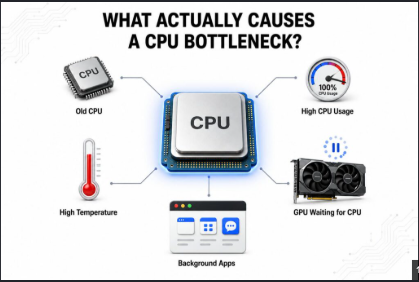
When building a gaming PC or upgrading an existing computer, it is important to understand how different hardware components work together. The processor, or CPU, plays a major role in running games, applications, and background tasks. If the CPU cannot keep up with the rest of the system, it may become a performance limitation. A CPU bottleneck calculator can help users identify whether their processor may be holding back other components, particularly the graphics card. A CPU bottleneck calculator is designed to estimate the relationship between the processor and other hardware. It can be useful for gamers, PC builders, and users who are considering a hardware upgrade. Instead of choosing components based only on their individual specifications, users can use a calculator to get a better idea of how those components may perform together. What Is a CPU Bottleneck? A CPU bottleneck occurs when the processor becomes the limiting component in a computer system. In a gaming PC, this usually means the CPU cannot process game-related information quickly enough to allow the GPU to operate at its full potential. The CPU handles many important tasks, including game logic, artificial intelligence, physics calculations, input processing, and communication between different components. When the workload becomes too demanding for the processor, performance can become limited even if the graphics card is powerful enough to handle the visual workload. For example, a modern high-end GPU paired with an older CPU may not deliver the expected frame rates in certain games. The GPU may have additional processing capacity, but the CPU cannot provide data quickly enough. What Is a CPU Bottleneck Calculator? A CPU bottleneck calculator is a tool that estimates whether a particular processor may limit the performance of another component, usually a GPU. Users may enter details such as: CPU model GPU model RAM capacity Screen resolution Refresh rate Intended usage The calculator compares the selected hardware and provides an estimated result. Depending on the tool, the result may be expressed as a percentage or a general rating. The purpose is to provide a quick overview of possible performance limitations. It should not be considered an exact measurement because actual performance varies between games, applications, and system configurations. How Does a CPU Bottleneck Affect Gaming? CPU performance can have a major effect on gaming, especially when users want high frame rates. At lower resolutions, the graphics card may be able to render frames very quickly. In this situation, the CPU has to prepare and deliver game data at a fast rate. If the processor cannot keep up, the frame rate may become limited by the CPU. A CPU bottleneck may appear as: Lower-than-expected frame rates Unstable frame rates Stuttering Poor performance in CPU-heavy games Lower GPU utilization However, these symptoms can also have other causes, so a bottleneck calculator should be used as an initial diagnostic tool rather than a final answer. CPU Bottleneck vs. GPU Bottleneck Understanding the difference between CPU and GPU bottlenecks is important. A CPU bottleneck occurs when the processor limits the system's performance. A GPU bottleneck occurs when the graphics card becomes the primary limitation. For example, suppose a computer has a powerful CPU and a mid-range graphics card. In a demanding game, the GPU may reach its maximum capacity while the CPU still has available resources. This is a GPU bottleneck. If the same computer uses a very powerful graphics card with an older processor, the CPU may become the limiting factor. Neither situation is automatically bad. The ideal balance depends on the type of performance the user wants. Why Resolution Matters Resolution can significantly influence CPU bottlenecks. At 1080p, the GPU has fewer pixels to render, so the processor may become a more important factor, especially when paired with a high-performance graphics card. At 1440p, the graphics workload increases and the GPU becomes more involved. At 4K, the GPU typically has a much heavier workload. As a result, a CPU bottleneck that is noticeable at 1080p may become less significant at higher resolutions. This is why a CPU bottleneck calculator should be used with the intended gaming resolution in mind. Benefits of Using a CPU Bottleneck Calculator A CPU bottleneck calculator can be useful in several situations. Planning a GPU Upgrade If you are thinking about buying a new graphics card, you can check whether your existing processor is likely to limit it. Building a New PC When selecting components for a new computer, comparing the CPU and GPU can help create a more balanced configuration. Troubleshooting Performance If your computer is not performing as expected, a bottleneck calculator can provide an initial indication of whether processor performance might be involved. Saving Money A calculator can help prevent unnecessary upgrades. Instead of replacing multiple components, you may discover that upgrading one specific part is more appropriate. Is a CPU Bottleneck Calculator Accurate? A CPU bottleneck calculator can provide useful estimates, but it cannot predict every real-world situation accurately. Different games and applications use CPU resources differently. One game may depend heavily on processor speed and individual CPU cores, while another may place more emphasis on GPU performance. Other factors also influence performance, including: RAM speed and capacity CPU temperature GPU drivers Game optimization Background applications Power settings Cooling Graphics settings Because of these variables, calculator results should be treated as a general guideline. How to Reduce a CPU Bottleneck If your processor is consistently limiting performance, there are several possible approaches. First, make sure the system is properly configured and that unnecessary background applications are not consuming CPU resources. Keeping software and drivers updated can also help. Reducing certain CPU-intensive game settings may improve performance. In some cases, upgrading the CPU is the most effective solution. However, upgrading should be based on actual performance needs. If your current computer already provides the frame rate and responsiveness you want, a theoretical bottleneck may not require any action. Choosing a Balanced CPU and GPU A balanced PC does not mean that the CPU and GPU must have identical performance levels. Instead, the components should be appropriate for the user's workload. For a gaming PC focused on competitive titles and high frame rates, CPU performance may be particularly important. For high-resolution gaming with advanced graphics settings, investing more heavily in the GPU may make more sense. Budget should also be considered. Spending more on a component that provides little practical improvement is not always worthwhile. Final Thoughts A CPU Bottleneck Calculator is a useful tool for gamers and PC builders who want to understand whether their processor may limit graphics performance. It can help with hardware selection, upgrade planning, troubleshooting, and creating a balanced computer system. However, the results should always be treated as estimates. Actual performance depends on the game or application, resolution, settings, cooling, memory, drivers, and many other factors. The best approach is to use a CPU bottleneck calculator as a starting point and then consider your real-world performance requirements. By understanding how the CPU interacts with the GPU and other components, you can make smarter upgrade decisions and build a PC that delivers the performance you need.

 English
 Arabic
 French
 Spanish
 Portuguese
 Deutsch
 Turkish
 Dutch
Dutch
 Italiano
 Romaian
 Portuguese (Brazil)
 Greek
Greek