


Network Tool Kits: Essential Tools Every Network Technician Needs
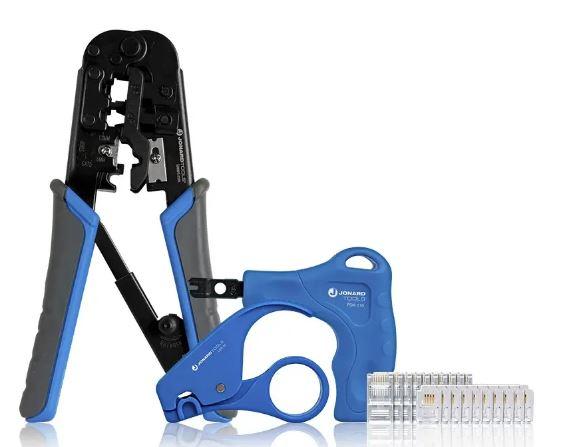
Reliable network installations require more than cables and connectors. Technicians need the right tools to prepare cables, terminate connections, test wiring, and troubleshoot faults. A well organized network tool kit brings these essentials together, helping professionals complete installation and maintenance tasks more efficiently.
Whether you install broadband connections, maintain telecommunications systems, configure Ethernet networks, or service CCTV installations, choosing the right tools can reduce rework and simplify everyday jobs. This guide explains what network tool kits contain, which tools technicians should prioritize, and how to select a kit that matches their needs.
What Are Network Tool Kits?
Network tool kits are collections of hand tools and accessories used to install, maintain, and troubleshoot network cabling and related equipment. Depending on their intended application, kits may include cable strippers, crimping tools, punchdown tools, cable testers, screwdrivers, and other installation essentials.
Technicians use these kits in residential, commercial, industrial, and telecommunications environments. A basic kit may support occasional Ethernet repairs, while a professional network tool kit may include specialized tools for frequent cable termination, testing, and field service work.
The right kit depends on the type of cable, connectors, equipment, and tasks involved. A kit designed for general computer repairs may not contain everything needed for structured cabling or coaxial installations.
Network Tool Kits List: Essential Tools and Their Uses
Before choosing a kit, understand what each tool does and when you need it.
1. Cable Strippers
Cable strippers remove the outer jacket or insulation from cables without unnecessarily damaging the conductors inside. Technicians use them when preparing Ethernet, coaxial, and other compatible cables for termination.
Choose a stripper designed for the cable type and size you handle. Proper cable preparation helps prevent damaged conductors and unreliable connections.
2. Cable Cutters
Cable cutters provide clean, controlled cuts during cable installation and repair. They help technicians prepare cables to the required length and remove damaged sections before determination.
Select cutters suited to the cable material and diameter. Using an unsuitable cutter can deform the cable or make preparation more difficult.
3. Crimping Tools
Crimping tools attach compatible modular plugs to cable ends by securing the contacts against the conductors. Technicians commonly use them when making Ethernet or telephone patch cables.
The tool must match the connector type and cable construction. Some models support specific modular plug designs, so check compatibility before using a crimper for RJ45 or telephone connectors.
4. Punchdown Tools
Punchdown tools press insulated conductors into insulation displacement connection (IDC) terminals. Technicians use them to terminate Ethernet cables at compatible keystone jacks, patch panels, and telephone blocks.
Impact tools often suit repetitive termination work, while non-impact models may be appropriate for certain lighter duty applications. Always use a blade compatible with the tool and termination hardware.
5. Network Cable Testers
Network cable testers help technicians check wire mapping, continuity, and common wiring faults. Depending on the model, a tester may identify open circuits, short circuits, crossed conductors, or other connection problems.
Testing cables after termination helps catch faults before the installation goes into service. More advanced equipment may be necessary when a project requires performance qualification or formal certification.
6. Screwdrivers and Nut Drivers
Technicians use screwdrivers and nut drivers to secure equipment, open compatible enclosures, mount network hardware, and tighten fasteners. A selection of common sizes helps them handle different mounting and maintenance tasks.
Insulated tools may be appropriate for certain electrical tasks, but technicians must still follow the equipment manufacturer's safety instructions and applicable procedures.
7. Cable Tracers and Identification Accessories
Cable tracers help technicians locate a specific cable within a bundle or along a route. Identification accessories and labels make it easier to distinguish cable runs at patch panels, network cabinets, and outlets.
These tools become particularly valuable during troubleshooting and upgrades, when technicians may encounter crowded cabinets or poorly labeled installations.
What Should a Professional Network Tool Kit Include?
A professional network tool kit should match the technician's most frequent tasks rather than simply contain the largest number of items.
For Ethernet installation, prioritize a compatible cable stripper, modular crimping tool, punchdown tool, and network cable tester. Technicians working with structured cabling may also need interchangeable punchdown blades, cable cutters, and identification accessories.
CATV and coaxial installers should look for suitable coaxial cable preparation and connector installation tools. Fiber optic technicians require specialized tools and equipment for fiber preparation, cleaning, inspection, and testing.
A kit for field service may also benefit from screwdrivers, nut drivers, and compact storage for small accessories. Review the product specifications to confirm which tools and accessories the kit actually includes; not every kit contains every item.
How to Choose the Best Network Tool Kits
The best network tool kits provide the right combination of compatibility, durability, portability, and functionality for the work you perform.
Match the kit to your application. Identify whether you mainly install Ethernet, maintain telecom wiring, prepare coaxial cables, or perform general network repairs. Choose tools designed for those tasks.
Check connector compatibility. Confirm that crimpers, strippers, and punchdown blades match your cable types and termination hardware.
Prioritize build quality. Technicians who use tools every day should consider comfortable grips, durable construction, and dependable operation.
Consider testing requirements. A basic continuity tester may suit simple wiring checks, while advanced installations may require qualification, certification, or specialized test equipment.
Look for practical organization. A storage case with dedicated spaces for tools and accessories helps technicians find items quickly and reduces the chance of losing small components.
Avoid unnecessary extras. A larger kit is not automatically better. Select the tools you need most often, then add specialized equipment for particular projects.
Why IT Tools Kits Matter for Field Technicians
An organized IT tools kit helps technicians prepare for common installation and maintenance tasks without carrying several separate toolboxes. It can reduce time spent searching for equipment and help standardize the tools used across service teams.
For broadband installers, the right tools support cable preparation, termination, and connection testing. Telecom technicians can use suitable punchdown and cable preparation tools to maintain structured wiring. CCTV installers may need Ethernet termination tools and cable testers when working with IP cameras and network-powered devices.
However, a toolkit does not replace correct training or safe working practices. Technicians should inspect tools before use, follow manufacturer instructions, and use specialized equipment whenever the task requires it.
Conclusion
Network tool kits help technicians install, maintain, and troubleshoot cabling systems more efficiently. Essential tools may include cable strippers, cutters, crimping tools, punchdown tools, network cable testers, and screwdrivers.
When comparing professional network tool kits, focus on application, connector compatibility, build quality, testing needs, and storage. The right combination helps reduce avoidable installation errors and keeps everyday service work organized.
Explore the Jonard Tools Network Tool Kits category to find tool-kit options for network installation, telecommunications, and field maintenance.
Frequently Asked Questions
What tools should a network tool kit include?
A typical network installation kit may include cable strippers, cable cutters, a crimping tool, a punchdown tool, and a network cable tester. The exact contents depend on the cable types and tasks involved.
What is the difference between a network tool kit and an IT tools kit?
A network tool kit usually focuses on cable installation, termination, and testing. An IT tools kit can also include screwdrivers and precision tools for servicing computers, networking hardware, and other electronic equipment.
How do I choose a professional network tool kit?
Choose a kit based on your main applications, compatible connectors, tool durability, testing requirements, portability, and included accessories. Check the product specifications before purchasing.
Are network tool kits suitable for beginners?
Yes. A suitable kit can help beginners learn cable preparation, termination, and basic testing. They should follow tool instructions and seek appropriate training before attempting unfamiliar or safety sensitive work.

 English
 Arabic
 French
 Spanish
 Portuguese
 Deutsch
 Turkish
 Dutch
Dutch
 Italiano
 Russian
 Romaian
 Greek
Greek