


ICEGATE Registration for Import Export Businesses: Complete Guide to AD Code & E-Sanchit Registration
What Is ICEGATE Registration?
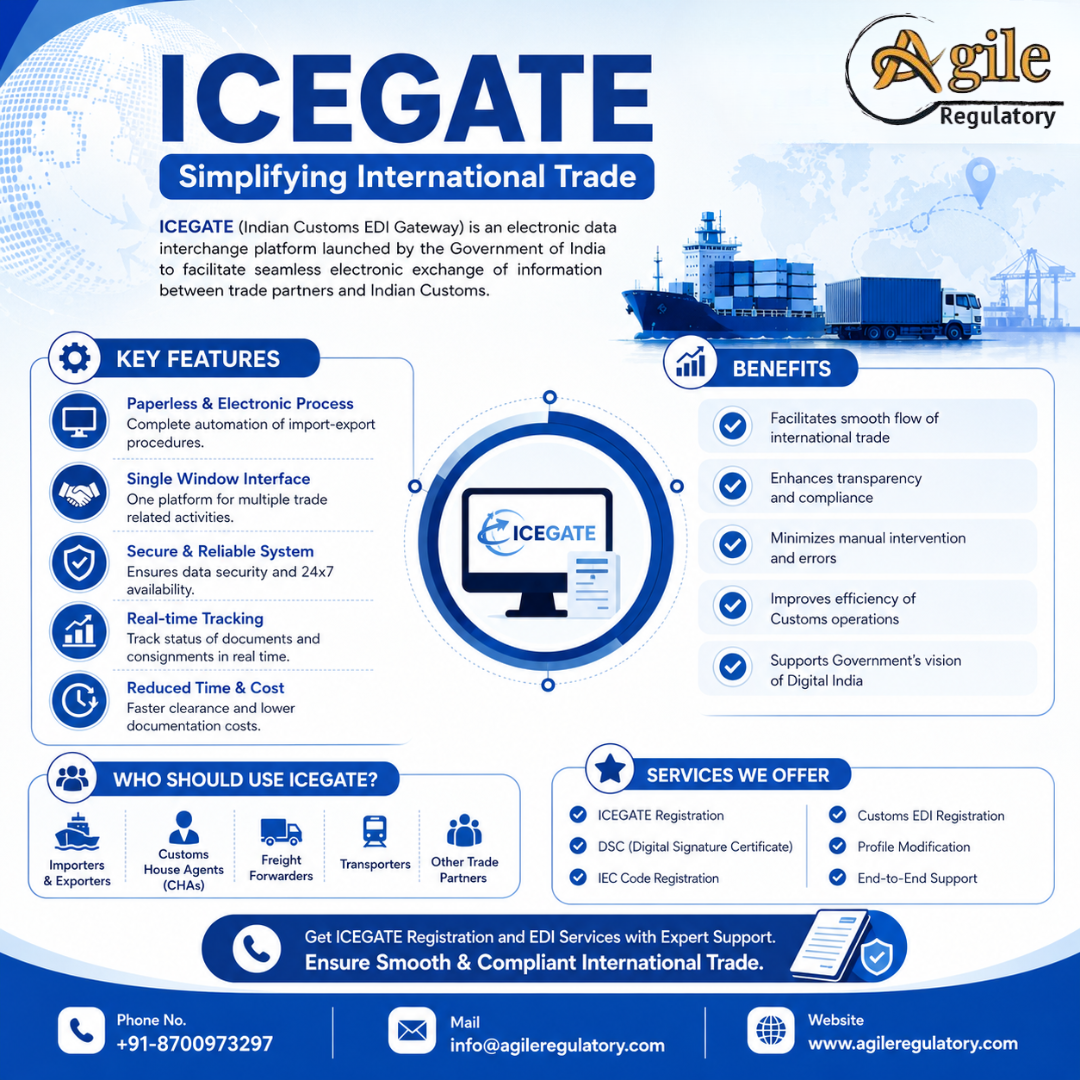
ICEGATE Registration is the process of creating an account on the Indian Customs and Central Excise Electronic Commerce/Electronic Data Interchange (EDI) Gateway, commonly known as ICEGATE. It is the official online portal of Indian Customs managed by the Central Board of Indirect Taxes and Customs (CBIC).
ICEGATE registration enables importers, exporters, customs house agents, and freight forwarders to interact with Indian Customs electronically. It allows businesses to file customs documents, pay duties online, track shipments, and manage import-export compliance through a single digital platform.
What Is the Full Form of ICEGATE?
The ICEGATE full form is Indian Customs and Central Excise Electronic Commerce/Electronic Data Interchange (EDI) Gateway. It is accessible at icegate.gov.in and serves as the official customs online portal for all trade-related electronic transactions in India.
Why Is ICEGATE Registration Important for Import Export Businesses?
ICEGATE registration is important because it provides legal access to the Indian Customs electronic system. Without a valid registration, businesses cannot file Bills of Entry, Shipping Bills, or make customs duty payments online.
For importers and exporters, ICEGATE registration helps in:
- Filing Bills of Entry and Shipping Bills electronically
- Making customs duty payments online
- Tracking import and export consignments in real time
- Reducing paperwork and manual intervention
- Ensuring compliance with CBIC regulations
- Accessing customs services through a single login
Who Needs ICEGATE Registration?
ICEGATE registration is mandatory for a wide range of trade stakeholders, including:
Importers and Exporters
All businesses involved in cross-border trade must complete ICEGATE registration using their IEC code. Holding a valid Import Export Code (IEC) is a prerequisite for ICEGATE registration.
Customs House Agents (CHA)
ICEGATE registration for CHA is mandatory for all licensed Customs House Agents who file customs documents on behalf of importers and exporters.
Freight Forwarders and Shipping Lines
Freight forwarders, shipping lines, airlines, and port operators also require ICEGATE user registration to submit manifests, arrival reports, and other trade documentation electronically.
Types of ICEGATE Registration
There are multiple types of ICEGATE registration available on the icegate.gov.in portal:
| Registration Type | Applicable To | Prerequisite |
|---|---|---|
| IEC-Based Registration | Importers & Exporters | Valid IEC Code |
| CHA Registration | Customs House Agents | Valid CHA Licence |
| Shipping Line Registration | Shipping Companies | DGFT Registration |
| Airline Registration | Air Cargo Carriers | DGCA Approval |
| Port/Airport Registration | Port Operators | Ministry Approval |
Choosing the correct registration type is the first and most critical step in the ICEGATE registration process.
Documents Required for ICEGATE Registration
The documents required for ICEGATE registration vary based on the type of registration being applied for:
| Document | Applicable To | Purpose |
|---|---|---|
| IEC Certificate | Importers & Exporters | Mandatory prerequisite |
| PAN Card | All applicants | Identity verification |
| GST Registration Certificate | All applicants | Tax compliance proof |
| Class 3 Digital Signature Certificate (DSC) | All applicants | Electronic authentication |
| CHA Licence | CHA applicants | Licence verification |
| Address Proof | All applicants | Business address verification |
| Email ID & Mobile Number | All applicants | Communication & OTP verification |
| Bank Account Details | All applicants | e-Payment setup |
Submitting accurate and complete documentation is essential for successful ICEGATE registration certificate issuance.
ICEGATE Registration for Importers & Exporters | Online Customs Portal Guide 2026
ICEGATE registration for importers & exporters enables smooth customs filing, shipping bill submission, bill of entry processing, and consignment tracking. Register online with a valid IEC, PAN, GST certificate, and Class 3 DSC. Get expert support for quick ICEGATE registration and hassle-free import-export compliance in India.
Eligibility for ICEGATE Registration
IEC Code Requirement
All importers and exporters must hold a valid Import Export Code (IEC) issued by DGFT before applying for ICEGATE registration. The IEC number serves as the primary identifier on the ICEGATE portal.
Digital Signature Certificate (DSC) Requirement
A valid Class 3 Digital Signature Certificate is mandatory for completing ICEGATE registration. The DSC ensures secure electronic authentication of all customs filings and transactions on the portal.
ICEGATE Registration Process for Import Export Businesses
The ICEGATE registration for Import Export can be completed entirely online through the official icegate.gov.in portal.
Step 1: Visit ICEGATE Portal
Navigate to the official ICEGATE portal at icegate.gov.in and click on the "Register" option on the homepage to initiate the registration process.
Step 2: Select Registration Type
Choose the appropriate registration category — IEC holder, CHA, Shipping Line, Airline, or Port Operator — based on your business type.
Step 3: Fill Application Form
Enter all required details including IEC number, PAN, GST registration number, business address, email ID, and mobile number. Ensure all information matches your official business registration documents accurately.
Step 4: Upload Documents and DSC
Upload all required supporting documents in the prescribed format. Attach your valid Class 3 Digital Signature Certificate for electronic authentication.
Step 5: Submit and Get Credentials
After successful submission, the system generates your ICEGATE registration certificate and login credentials. You can then use these credentials to access all customs services on the ICEGATE portal.
E-Sanchit ICEGATE Registration Process
E-Sanchit ICEGATE registration is an electronic document management system on the ICEGATE portal that allows traders to upload and manage supporting documents for customs clearance electronically.
What Is E-Sanchit?
E-Sanchit stands for Electronic Supporting Documents for Customs, Excise, and Trade. It enables importers and exporters to submit supporting documents such as invoices, packing lists, certificates, and licences electronically instead of physically submitting them to customs.
E-Sanchit Registration Process
- Log in to the ICEGATE portal using registered credentials.
- Navigate to the E-Sanchit module.
- Upload the required supporting documents in the prescribed format.
- Each document is assigned a unique IRN (Image Reference Number).
- Use the IRN while filing Bills of Entry or Shipping Bills.
- Customs officers can access the documents electronically during clearance.
E-Sanchit reduces paperwork, speeds up customs clearance, and ensures secure document management for importers and exporters.
AD Code Registration on ICEGATE
AD Code Registration on ICEGATE is the process of linking an exporter’s 14-digit Authorized Dealer Code and bank account with Indian Customs. The AD Code is issued by the exporter’s bank branch authorized to deal in foreign exchange.
AD Code registration is mandatory for exporters because it is required for generating shipping bills and receiving export proceeds in the registered bank account.
Documents Required for AD Code Registration
- AD Code letter issued by the Authorized Dealer bank
- Valid IEC certificate issued by DGFT
- PAN Card of the exporter
- GST Registration Certificate
- Cancelled cheque or bank statement of the linked current account
- Class 3 Digital Signature Certificate
- Business registration proof
- Authorization letter, if applicable
AD Code Registration Process
- Request an AD Code letter from your bank’s Authorized Dealer or foreign exchange department.
- Log in to the ICEGATE portal using registered credentials.
- Go to Bank Account Management.
- Select AD Code Registration.
- Enter the bank name, branch, IFSC, AD Code, and customs port details.
- Upload the AD Code letter, IEC certificate, PAN, GST certificate, and bank proof.
- Submit the application through e-Sanchit.
- Track the application until it is approved by the Customs officer.
Once approved, the AD Code is linked to the exporter’s IEC and can be used for shipping bill filing and export transactions.
Authorization Letter Format for ICEGATE Registration
An authorization letter format for ICEGATE registration is required when a consultant, employee, or customs broker files the application on behalf of the business. The letter should include:
- Date of authorization
- Name and address of the company
- Name and designation of the authorized signatory
- Details of the person being authorized
- Scope of authorization (e.g., ICEGATE registration, AD Code registration, E-Sanchit filing)
- Signature and stamp of the authorized signatory
- Supporting documents such as PAN, IEC, and DSC details
The authorization letter ensures that the consultant or agent has legal permission to act on behalf of the importer or exporter.
ICEGATE Registration Fees
The ICEGATE registration fees are structured based on the type of user registering on the portal:
| Registration Type | Registration Fee | Validity |
|---|---|---|
| IEC Holder (Importer/Exporter) | Free of Cost | Permanent |
| CHA Registration | Free of Cost | Permanent |
| Shipping Line Registration | Free of Cost | Permanent |
| DSC Registration | Free of Cost | As per DSC validity |
| Professional Assistance | As per service plan | N/A |
While ICEGATE registration itself is free, obtaining a Class 3 DSC and professional assistance may involve additional charges.
How to Login to ICEGATE Portal After Registration
Once ICEGATE registration is successfully completed, you can log in to the portal using your registered credentials.
First-Time Login Steps
- Visit icegate.gov.in and click on the "Login" button.
- Enter your ICEGATE registration User ID and password.
- Authenticate using your Class 3 Digital Signature Certificate.
- Complete OTP verification sent to your registered mobile number.
- Access the dashboard and begin using customs e-filing services.
How to Reset ICEGATE Password
In case of a forgotten password, click on the "Forgot Password" option on the login page. Enter your registered email ID and follow the OTP-based verification process to reset your ICEGATE login credentials.
Key Features of ICEGATE Portal
Customs E-Filing
ICEGATE e-filing allows registered users to electronically file Bills of Entry, Shipping Bills, and other trade documents directly with Indian Customs.
e-Payment of Customs Duty
ICEGATE enables businesses to pay import duties, export duties, and other customs levies through net banking, NEFT, and RTGS.
Import and Export Document Tracking
ICEGATE provides real-time tracking of all import and export consignments. Users can check the status of their Bills of Entry and Shipping Bills at any time.
IGCR Module
The Interest on Customs Goods for Consumption in India (IGCR) module allows businesses to avail conditional duty exemptions on imported goods.
Services Available on ICEGATE Portal
| Service | Description | Applicable To |
|---|---|---|
| e-Filing of Bills of Entry | Electronic submission of import documents | Importers, CHA |
| e-Filing of Shipping Bills | Electronic submission of export documents | Exporters, CHA |
| e-Payment of Customs Duty | Online duty payment via banking channels | All registered users |
| Document Status Tracking | Real-time status of trade documents | All registered users |
| IGCR Module | Conditional duty exemption management | Manufacturers |
| Manifest Filing | Electronic filing of cargo manifests | Shipping Lines, Airlines |
| DSC Registration | Digital signature mapping and management | All registered users |
Difference Between ICEGATE Registration and IEC Registration
Many businesses confuse ICEGATE registration with IEC registration. While both are essential for import-export trade, they serve different purposes:
| Parameter | ICEGATE Registration | IEC Registration |
|---|---|---|
| Purpose | Access to Indian Customs portal for e-filing | Legal authorisation to import/export goods |
| Issuing Authority | CBIC / Indian Customs | DGFT |
| Prerequisite | Requires valid IEC code | Requires PAN card and bank account |
| Validity | Permanent (subject to DSC renewal) | Permanent (lifetime) |
| Primary Use | Customs e-filing and duty payment | Import/export trade authorisation |
| DSC Required | Yes — Class 3 DSC mandatory | No — DSC not required |
Common Errors in ICEGATE Registration and How to Fix Them
DSC Errors
DSC-related errors are the most common issue during ICEGATE registration. Ensure your Class 3 DSC is valid, issued by a CBIC-approved Certifying Authority, properly installed on your browser, and has not expired.
IEC Mismatch Errors
IEC mismatch errors occur when the details entered in the registration form do not match the IEC database at DGFT. Verify that your IEC details — name, address, and PAN — exactly match your DGFT records.
Portal Login Issues
Common ICEGATE login issues include incorrect credentials, browser compatibility problems, and session timeouts. Always use updated browsers like Chrome or Firefox and ensure your DSC token is properly connected.
Why Hire an ICEGATE Registration Agent?
An ICEGATE registration agent helps importers and exporters with:
- ICEGATE new registration and profile creation
- Class 3 DSC registration and mapping
- AD Code registration on ICEGATE
- E-Sanchit document upload and management
- Correction of IEC, PAN, GST, or bank-detail mismatches
- Filing and tracking customs-related applications
- Coordination with banks and Customs authorities
- Resolving portal errors, approval delays, and technical issues
Professional support is especially useful for first-time exporters, businesses with multiple bank accounts, and companies facing AD Code or ICEGATE verification issues.
How to Check ICEGATE Registration Status
To check your ICEGATE registration status:
- Visit the official ICEGATE website.
- Navigate to the "Registration Verification" section.
- Enter your PAN number and captcha.
- Submit to view your registration status.
If approved, you will see details like your ICEGATE ID, registration date, and role.
Key Points to Remember
- ICEGATE registration is mandatory for importers, exporters, CHAs, and freight forwarders.
- A valid IEC, PAN, GSTIN, and Class 3 DSC are required for registration.
- AD Code registration on ICEGATE links the exporter’s bank account with Indian Customs.
- E-Sanchit enables electronic submission of supporting documents for customs clearance.
- ICEGATE registration itself is free, but DSC costs may apply.
- Professional consultant support can help avoid delays and documentation errors.
Conclusion
ICEGATE registration for import export businesses is a crucial step for smooth customs compliance and international trade operations. Along with ICEGATE registration, exporters must complete AD Code registration on ICEGATE to link their bank account with Indian Customs and receive export proceeds correctly.
With a valid IEC, PAN, GST registration, Class 3 DSC, and accurate documentation, businesses can complete ICEGATE registration and AD Code registration online without delays. Professional ICEGATE registration support can further simplify the process for importers and exporters.
FAQs for ICEGATE Registration
1. What is ICEGATE registration and who needs it?
ICEGATE registration is the process of creating an account on the Indian Customs Electronic Gateway. It is mandatory for importers, exporters, customs house agents, and freight forwarders who wish to interact with Indian Customs electronically.
2. What documents are required for ICEGATE registration?
The main documents required for ICEGATE registration include an IEC certificate, PAN card, GST registration certificate, Class 3 DSC, business address proof, and bank account details. The IEC, PAN, and GSTIN details must match accurately.
3. What is AD Code registration on ICEGATE?
AD Code registration on ICEGATE is the process of linking an exporter’s 14-digit Authorized Dealer Code and bank account with Indian Customs. It is mandatory for exporters to generate shipping bills and receive export proceeds.
4. What is E-Sanchit in ICEGATE?
E-Sanchit is an electronic document management system on the ICEGATE portal that allows importers and exporters to upload and manage supporting documents for customs clearance electronically. Each document is assigned a unique Image Reference Number (IRN).
5. Is there any fee for ICEGATE registration?
ICEGATE registration itself is free of cost for IEC holders, CHAs, and shipping lines. However, obtaining a Class 3 Digital Signature Certificate (DSC) and professional assistance may involve additional charges.

 English
 Arabic
 French
 Spanish
 Portuguese
 Deutsch
 Turkish
 Dutch
Dutch
 Russian
 Romaian
 Portuguese (Brazil)
 Greek
Greek