


How Unicode Text Styling Works: A Practical Guide to Fancy Fonts in Social Media Bios
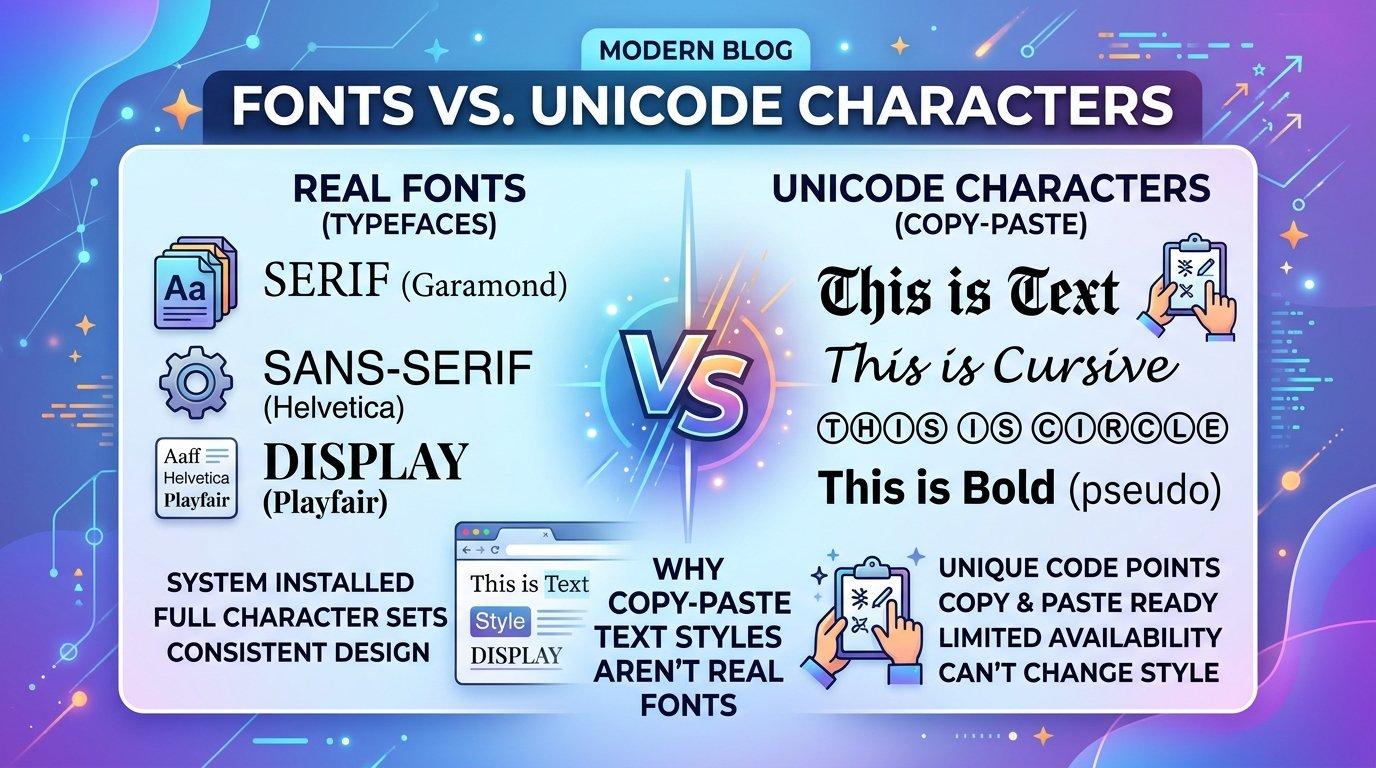
Scroll through any Instagram, TikTok, or X profile and you’ll notice that some bios stand out with bold lettering, flowing script, or decorative characters that look nothing like the platform’s default font. Most people assume these are special fonts, but they aren’t fonts at all. Understanding how this styling works helps you use it well, avoid common mistakes, and keep your profile readable for everyone.
Why Default Fonts Limit Your Bio
Social platforms lock users into a single typeface. You can’t pick a font in your Instagram bio settings or choose a different style for your TikTok username. That restriction exists for consistency and performance, but it leaves creators looking for ways to express personality within a few lines of text.
The workaround is not changing the font. It is changing the characters themselves.
What Is Unicode Text Styling?
Unicode is the universal standard that assigns a unique number to every character used in written language, across thousands of symbols and scripts. The Unicode Consortium maintains this standard so that text looks consistent across devices, operating systems, and applications.
Within Unicode there are blocks of characters designed for mathematical and technical notation, such as “Mathematical Alphanumeric Symbols.” These include bold, italic, script, fraktur, and double-struck versions of the Latin alphabet. Because they are real characters rather than formatting, they can be copied and pasted anywhere that supports Unicode, including bios, captions, and usernames.
That is why a styled bio survives copy and paste while bold formatting from a word processor does not.
Font vs. Character: A Key Difference
It helps to separate two ideas that often get confused:
- Fonts change how a character is drawn on screen. The underlying letter stays the same, so an “A” in Arial and an “A” in Georgia are both the same character.
- Unicode styled text swaps one character for a different character that happens to look decorative. The styled “𝓐” is technically a different symbol from “A.”
This distinction explains both the strengths and the weaknesses of the technique. It works almost everywhere, but screen readers, search functions, and some older devices may handle it differently than plain text.
Common Styles and Where They Work Best
Here are the most popular categories and how people tend to use them:
- Bold and italic: Subtle emphasis for names, job titles, or a single key phrase in a bio.
- Script and cursive: Elegant, handwritten-looking letters suited to lifestyle, beauty, wedding, and creative profiles.
- Gothic or fraktur: A dramatic, old-world look common in gaming, music, and alternative aesthetics.
- Double-struck and monospace: A clean, technical feel often seen in developer and tech profiles.
- Bubble and square characters: Playful styles that suit casual or youth-oriented accounts.
Tools like a Fancy Text Generator automate the conversion by mapping each regular letter to its Unicode equivalent, so you can preview several styles at once instead of hunting through character tables by hand.
A Closer Look at Cursive Styling
Of all the decorative styles, script lettering is probably the most requested. It mimics handwriting, which gives a bio a personal and polished feel. A Cursive Text Generator typically offers two flavors: formal script with sharp, calligraphic strokes, and a rounder, casual script that looks closer to everyday handwriting.
A few practical notes on using cursive:
- Keep it short. Script characters are harder to read in long passages, so reserve them for a name or tagline.
- Mind the size. Thin strokes can blur on small mobile screens, especially in low-resolution displays.
- Test on multiple devices. Not every phone or browser renders every script glyph identically.
Accessibility: The Part Many People Overlook
The biggest drawback of decorative Unicode text is accessibility. Screen readers often interpret these characters as mathematical symbols and read them out one by one, or skip them entirely. A bio written fully in styled characters can become unintelligible to someone using assistive technology.
To stay inclusive:
- Use styled text for accents, not for essential information.
- Never put contact details, links, or key instructions in decorative characters.
- Keep your username and primary description in standard text.
- Avoid stacking multiple styles in one line.
This also benefits discoverability. Search engines and in-app search generally match standard characters, so a styled name may not appear when people search for it.
Best Practices for an Effective Bio
Good styling should support your message rather than distract from it. Consider these guidelines:
- Choose one style and stay consistent. Mixing three or four looks cluttered and unprofessional.
- Pair styled text with plain text. A decorative name followed by a regular-font description balances personality and clarity.
- Use symbols sparingly. A few well-placed characters create rhythm, while too many make a bio hard to scan.
- Match the style to your niche. Elegant script suits a florist, while monospace fits a software engineer.
- Check how it looks in dark mode and light mode. Contrast changes how thin or ornate characters appear.
Platform Compatibility Considerations
Most major platforms support Unicode, but behavior varies. Instagram, TikTok, X, Facebook, and Discord generally display styled characters correctly in bios and posts. Some platforms restrict special characters in usernames or handles, so decorative text may only work in display names and descriptions. Older operating systems and certain messaging apps may show empty boxes, known as “tofu,” when a character isn’t supported by the installed font.
When in doubt, preview your text on at least one iPhone and one Android device before committing to it.
Final Thoughts
Decorative Unicode text is a simple, lightweight way to add personality to digital profiles without any special software. The key is understanding what it is: a clever use of existing characters, not a true font change. Used sparingly and with accessibility in mind, it can make a bio memorable while keeping it readable for everyone who visits your profile.
Treat styled text as seasoning rather than the main course, and your profile will look distinctive without sacrificing clarity.

 English
 Arabic
 French
 Spanish
 Portuguese
 Deutsch
 Turkish
 Italiano
 Russian
 Romaian
 Portuguese (Brazil)
 Greek
Greek