


How to Know When You Need MacBook Screen Replacement in Dubai
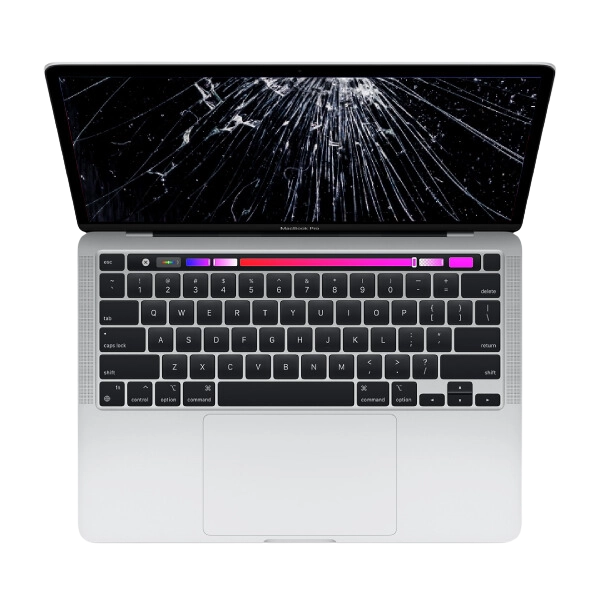
A MacBook is an important device for students, professionals, business owners, and creative users in Dubai. People rely on their MacBooks for office work, online meetings, education, graphic design, video editing, and everyday communication. A clear display makes these activities easier, but screen damage can affect your ability to use the device comfortably.
MacBook screens can develop problems because of accidental drops, pressure, liquid exposure, or internal hardware faults. Sometimes the damage is immediately visible, such as a cracked display. In other cases, you may notice flickering, coloured lines, black spots, or an image that disappears unexpectedly.
Knowing when you need MacBook screen replacement in Dubai can help you understand the problem and choose the right repair option. This guide explains the common warning signs, possible causes, and important factors to consider before arranging a screen replacement.
1. Visible Cracks on Your MacBook Screen
Visible cracks are one of the clearest signs of screen damage. They can happen if your MacBook falls, receives an impact, or has an object trapped between the keyboard and display when the lid is closed.
Even a small crack can make reading documents, viewing images, and completing everyday tasks uncomfortable. It may also spread if the screen receives additional pressure.
If your MacBook screen is cracked, avoid pressing the damaged area or repeatedly opening and closing the lid to test it. Further pressure may make the damage worse.
A technician can inspect the display and determine whether the screen assembly needs replacement. The correct repair depends on your MacBook model and the extent of the damage.
2. Black Spots or Dark Patches on the Display
Black spots and dark patches can indicate damage to the display panel. They may appear after an accidental drop, pressure on the screen, or another physical impact.
Some dark patches remain small, while others gradually spread across the display. They can make it difficult to read text, view photographs, or work with applications.
If you notice a dark area, avoid pressing it or trying to remove it by rubbing the screen. A professional inspection can help determine whether the display panel is damaged or another component is responsible.
If the panel itself has developed a fault, screen replacement may be recommended to restore normal viewing.
3. Vertical or Horizontal Lines Across the Screen
Lines appearing across your MacBook display are another warning sign. They may be vertical or horizontal and can appear in different colours, such as green, pink, white, or black.
Sometimes the lines remain visible all the time. In other cases, they appear when you move the display or change its position.
Possible causes include a damaged screen panel, a faulty display connection, or a graphics-related problem. Not every line means that the entire screen needs replacement.
A technician should inspect the display and related components before recommending a repair. This helps identify the actual source of the problem and avoid unnecessary part replacement.
4. Flickering or Flashing Display
A MacBook screen that flickers repeatedly can make daily work uncomfortable. You may notice the brightness changing unexpectedly, the display flashing, or the screen briefly going dark.
Flickering can result from software problems, display settings, graphics issues, or faulty hardware. It does not automatically mean that the screen needs replacement.
Start by restarting your MacBook and checking whether the issue continues. You can also review display settings and consider whether the problem began after a software update.
If the flickering continues, particularly after physical damage, arrange a professional inspection. A technician can determine whether the display panel or another component needs attention.
5. Completely Black MacBook Screen
Sometimes a MacBook appears to turn on, but the display remains completely black. You may hear startup sounds, notice keyboard activity, or see other signs that the laptop is running.
This issue can be caused by screen damage, software errors, power problems, or internal hardware faults.
First, check whether the MacBook has sufficient power. If possible, connect a compatible external display to see whether the computer produces an image there.
An external display test may help identify whether the problem is limited to the built-in screen, but it cannot confirm every possible cause. If the MacBook continues running without showing an image on its own display, arrange a professional inspection.
6. Uneven Brightness or Unusual Colours
Another sign of a possible display problem is uneven brightness or unusual colour changes. One section of the screen may look darker than another, or colours may appear different from normal.
These symptoms can be related to display damage, software settings, or hardware faults.
Before arranging a repair, check the brightness settings and restart the device. If the issue continues, a technician can examine the screen and determine whether the panel or another component is responsible.
This is especially important for people in Dubai who use MacBooks for photography, graphic design, video editing, and other visual work. Accurate display quality can make a difference when reviewing detailed content.
7. Screen Damage After a Drop or Pressure
A MacBook may continue working after a drop, even if its internal display components have been affected. Sometimes the damage becomes noticeable only after a few hours or days.
After an impact, look for cracks, flickering, coloured lines, black patches, or changes in display brightness.
Pressure can also damage the screen. Placing heavy objects on a laptop bag or closing the lid with a pen, cable, or other object on the keyboard may put pressure on the display.
If you notice any unusual symptoms after an accident, arrange an inspection. Early diagnosis can help you understand the repair options before the damage becomes more complicated.
8. Display Problems After Liquid Exposure
Liquid exposure can affect several MacBook components, including the display and internal connections. A drink spilled near the screen or keyboard may cause problems that are not immediately visible.
If liquid reaches your MacBook, disconnect the power source if safe to do so and stop using the device. Do not attempt to charge it, apply direct heat, or repeatedly switch it on to check whether it works.
Liquid damage does not always mean screen replacement is necessary. A technician should inspect the device to determine whether the display, internal connections, or other components have been affected.
9. When MacBook Screen Replacement Is the Right Solution
The correct repair depends on the cause of the problem, the MacBook model, and the condition of the rest of the device.
If the display panel is cracked, has extensive dark patches, or no longer produces a proper image because of physical damage, screen replacement may be the most suitable option.
However, some display problems are caused by software, graphics components, or internal connections. These issues may be resolved without replacing the entire screen.
Before approving any repair, ask the technician to explain the diagnosis and why a particular solution is recommended.
10. How to Choose a MacBook Screen Replacement Service in Dubai
Dubai has several laptop and Apple device repair providers, so comparing services is important before making a decision.
Consider the following points:
Experience with your MacBook model: Screen designs and replacement procedures can vary between MacBook Air and MacBook Pro models. Confirm that the technician has experience with your specific device.
Replacement part quality: Ask about the type of screen being offered and whether it is compatible with your model.
Transparent pricing: Request a clear estimate covering parts and labour before approving the repair.
Repair time: Ask how long the replacement is expected to take and whether the required part is available.
Warranty terms: Confirm whether the replacement part and repair work include a warranty. Ask what the warranty covers and what conditions apply.
Customer feedback: Read recent reviews to understand other customers' experiences with the repair provider.
These checks can help you select a service that meets your requirements and budget.
11. Contact Techfix.ae About MacBook Screen Repair
If your MacBook has a damaged display, you can contact Techfix.ae to ask about available MacBook repair options in Dubai.
Share your MacBook model and explain the symptoms you have noticed, such as cracks, black spots, flickering, or a completely black screen. Ask whether your specific model and screen replacement requirement are supported.
Before approving the work, request information about the inspection process, replacement screen options, estimated cost, repair time, and applicable warranty terms.
Getting these details in advance can help you understand the available solutions and make a more informed decision.
12. How to Protect Your MacBook Screen From Future Damage
After repairing your MacBook screen, simple precautions can help reduce the risk of future damage.
Use a padded laptop bag when travelling between home, university, and work in Dubai. Avoid placing heavy objects on your MacBook and make sure there are no pens, cables, or other items on the keyboard before closing the lid.
Open and close the display gently without twisting it or applying pressure to the corners. If the hinge becomes stiff or makes unusual noises, arrange an inspection rather than forcing it.
Clean the screen with a suitable soft cloth and follow Apple's cleaning recommendations. Avoid harsh chemicals and excessive pressure.
Regular backups are also useful before any repair. If your MacBook is still accessible, back up important files to a trusted storage location.
Conclusion
How to Know When You Need MacBook Screen Replacement in Dubai is an important topic for anyone experiencing display problems. Cracks, black spots, coloured lines, flickering, a completely black display, and unusual brightness changes are all signs that deserve attention.
Not every display problem requires a complete screen replacement. A professional diagnosis can help identify whether the issue comes from the display panel, software, graphics system, or another internal component.
For MacBook users in Dubai, choosing a repair provider with relevant experience, suitable replacement parts, transparent pricing, and clear warranty terms can make the process easier. If your MacBook screen is damaged or no longer works properly, arrange an inspection and compare the available repair options before approving the work.

 English
 Arabic
 French
 Spanish
 Portuguese
 Deutsch
 Turkish
 Italiano
 Russian
 Romaian
 Portuguese (Brazil)
 Greek